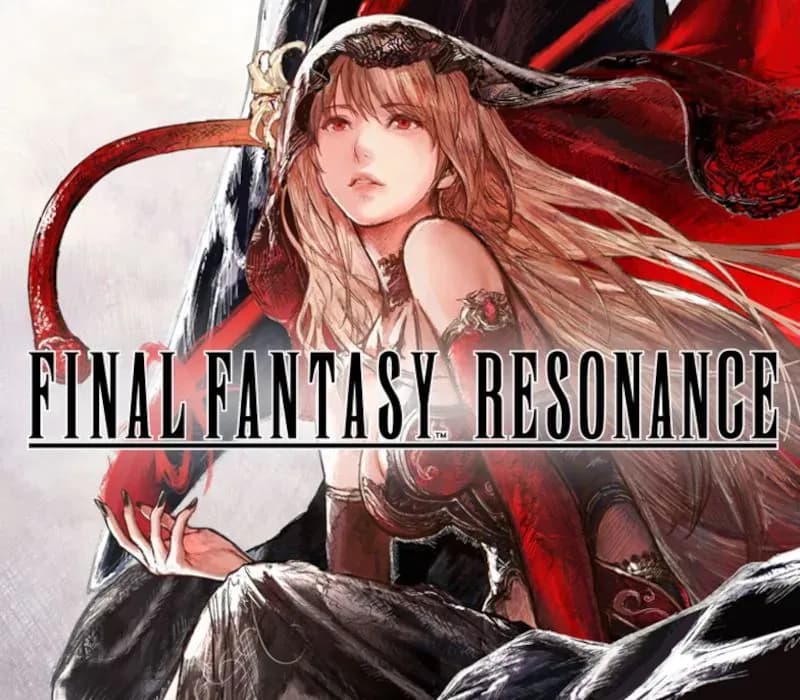
FINAL FANTASY RESONANCE PC Steam Account
FINAL FANTASY RESONANCE PC Steam Account is a game account for Steam, not region-locked. Price: $38.06, 23% below the Steam MSRP of $49.99.
Choose your version
Edition
How to buy it
- Steam
- Global
- Account
154,000+ sales in our store and on marketplaces
 Pago Móvil
 Binance Pay
About this game
Return to the pixel‑art world of FINAL FANTASY, evolved from its classic roots. Travel with companions bound by fate and call on Visions to aid you in battle to uncover the truth behind a force that threatens to bring everything to ruin.
◆ Cinematic pixel art
What if FINAL FANTASY had continued to push the limits of pixel art? The first FINAL FANTASY to join the HD‑2D lineup, FINAL FANTASY RESONANCE delivers a visually striking experience that feels both nostalgic and new, enhanced by dynamic camera angles and pixelized 3D models that make every moment more dramatic and immersive.
◆ A return to the familiar
A classic RPG adventure unfolds in a world filled with beloved FINAL FANTASY elements—airships, crystals, espers and moogles woven into the fabric of the story, and so much more.
◆ Strategic turn-based battles
Exploit enemy weaknesses to stagger them—breaking their defenses to seize extra turns and gain the upper hand with powerful Resonance attacks in cinematic battles shaped by smart choices.
◆ FINAL FANTASY legends
Bolster your team with Visions, echoes of beloved FINAL FANTASY characters, who fight alongside you with unique skills and abilities for deep party customization.
◆ Hours of side content to discover
The world is full of secrets, including the wandering swordmaster Gilgamesh, a Colosseum with deadly monsters and rewards to match, the Chamber of Arms with formidable foes sealed within legendary weapons, and a showdown with Ultima Weapon.
System Requirements
Minimum
- OS: Windows® 11
- Processor: AMD Ryzen™ 3 2300X / Intel® Core™ i3-8100
- Memory: 8 GB RAM
- Graphics: AMD Radeon™ RX 6400 / Intel® Arc™ A580 / NVIDIA® GeForce® GTX 1650
- DirectX: Version 12
- Storage: 15 GB available space
- Additional Notes: Display Resolution / Framerate:1920 × 1080 @ 30 FPS, Graphics Preset "Low"
Recommended
- OS: Windows® 11
- Processor: AMD Ryzen™ 5 2500X / Intel® Core™ i3-8100
- Memory: 8 GB RAM
- Graphics: AMD Radeon™ RX 5500 XT / Intel® Arc™ A580 / NVIDIA® GeForce® GTX 1650
- DirectX: Version 12
- Storage: 15 GB available space
- Additional Notes: Display Resolution / Framerate:1920×1080 @ 60 FPS, Graphics Preset "Highest"
How to activate
- Log out of your personal Steam account in the client or browser.
- Log in using the provided Steam username and password delivered with your order.
- Enter the Steam Guard security verification code sent to the temporary email access included in your purchase.
- Go to Steam -> Settings -> Account, and update both the contact email address and the account password to your own credentials.
- Install the game from the Library, or configure Family Library Sharing under Settings to play from your main account.
About this game
Return to the pixel‑art world of FINAL FANTASY, evolved from its classic roots. Travel with companions bound by fate and call on Visions to aid you in battle to uncover the truth behind a force that threatens to bring everything to ruin.
◆ Cinematic pixel art
What if FINAL FANTASY had continued to push the limits of pixel art? The first FINAL FANTASY to join the HD‑2D lineup, FINAL FANTASY RESONANCE delivers a visually striking experience that feels both nostalgic and new, enhanced by dynamic camera angles and pixelized 3D models that make every moment more dramatic and immersive.
◆ A return to the familiar
A classic RPG adventure unfolds in a world filled with beloved FINAL FANTASY elements—airships, crystals, espers and moogles woven into the fabric of the story, and so much more.
◆ Strategic turn-based battles
Exploit enemy weaknesses to stagger them—breaking their defenses to seize extra turns and gain the upper hand with powerful Resonance attacks in cinematic battles shaped by smart choices.
◆ FINAL FANTASY legends
Bolster your team with Visions, echoes of beloved FINAL FANTASY characters, who fight alongside you with unique skills and abilities for deep party customization.
◆ Hours of side content to discover
The world is full of secrets, including the wandering swordmaster Gilgamesh, a Colosseum with deadly monsters and rewards to match, the Chamber of Arms with formidable foes sealed within legendary weapons, and a showdown with Ultima Weapon.
System Requirements
Minimum
- OS: Windows® 11
- Processor: AMD Ryzen™ 3 2300X / Intel® Core™ i3-8100
- Memory: 8 GB RAM
- Graphics: AMD Radeon™ RX 6400 / Intel® Arc™ A580 / NVIDIA® GeForce® GTX 1650
- DirectX: Version 12
- Storage: 15 GB available space
- Additional Notes: Display Resolution / Framerate:1920 × 1080 @ 30 FPS, Graphics Preset "Low"
Recommended
- OS: Windows® 11
- Processor: AMD Ryzen™ 5 2500X / Intel® Core™ i3-8100
- Memory: 8 GB RAM
- Graphics: AMD Radeon™ RX 5500 XT / Intel® Arc™ A580 / NVIDIA® GeForce® GTX 1650
- DirectX: Version 12
- Storage: 15 GB available space
- Additional Notes: Display Resolution / Framerate:1920×1080 @ 60 FPS, Graphics Preset "Highest"
Customer Reviews
Nobody has reviewed this game yet. If you buy it, tell us how it went.
Frequently asked questions
Which region is this for?
This is the Global version: it is not region-locked.
How do I activate FINAL FANTASY RESONANCE PC Steam Account on Steam?
1. Log out of your personal Steam account in the client or browser. 2. Log in using the provided Steam username and password delivered with your order. 3. Enter the Steam Guard security verification code sent to the temporary email access included in your purchase. 4. Go to Steam -> Settings -> Account, and update both the contact email address and the account password to your own credentials. 5. Install the game from the Library, or configure Family Library Sharing under Settings to play from your main account.
What does “account” mean?
You receive login details for a Steam account that already owns the game.