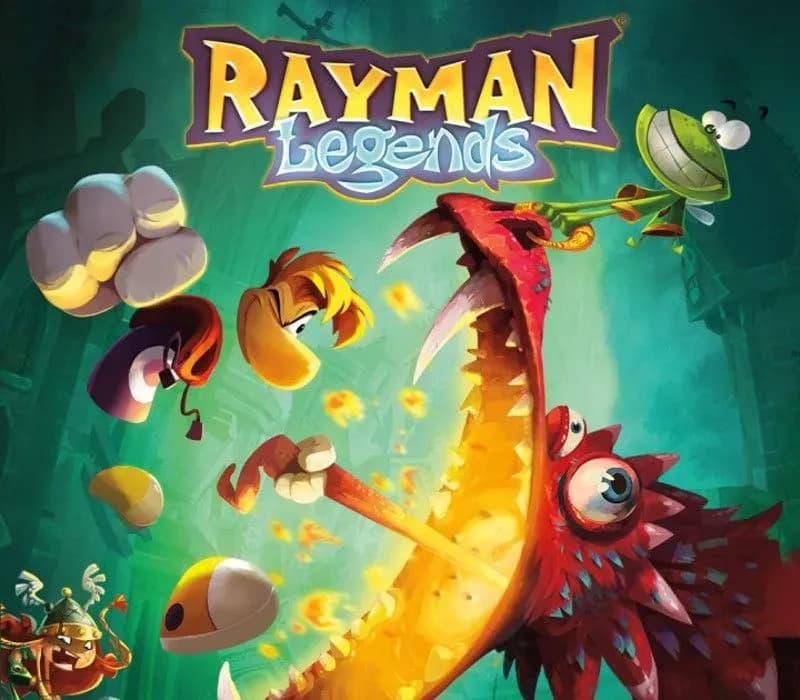
Rayman Legends PC Steam Gift
Rayman Legends PC Steam Gift is a gift for Steam, not region-locked.
Choose your version
Platform
How to buy it
- Steam
- Global
- Gift
154,000+ sales in our store and on marketplaces
 Pago Móvil
 Binance Pay
About this game
When Rayman, Globox, and the Teensies discover a mysterious tent filled with captivating paintings, they are suddenly transported to a series of mythical realms!
A LEGENDARY PLATFORMING ADVENTURE
Dash through 5 vibrant worlds, from a towering beanstalk to the heights of Mount Olympus. Free the kidnapped Teensies, discover hidden secrets, and uncover the secrets of the legendary paintings.
4-PLAYER LOCAL CO-OP
Bring up to 3 friends along for the ride! Work together to rescue Teensies, race for Lums, or slap anything that gets in your way. Need a break from the action? Settle the score on the pitch in Kung Foot.
EPIC BOSS BATTLES
Face off against towering dragons, masked giants, and other larger-than-life foes in action-packed showdowns. Stay on your toes, dodge their attacks, and strike when they least expect it!
ROCKIN’ RAYMAN
Jump to the beat of a drum, punch to the bass line, or zip-line during guitar riffs across unforgettable musical maps set to rock anthems, fiery salsa rhythms, and more, where timing and rhythm are key!
System Requirements
Minimum
- OS: Windows XP SP3 or Windows Vista SP2 or Windows 8 (both 32/64bit versions)
- Processor: Intel Pentium IV @ 3.0 GHz or AMD Athlon64 3000 + @ 1.8 GHz
- Memory: 2 GB RAM
- Graphics: nVidia GeForce 6800GT or AMD Radeon X1950 Pro (256MB VRAM with Shader Model 3.0 or higher)
- Storage: 6 GB available space
- Sound Card: DirectX Compatible Sound Card with latest drivers
- Additional Notes: Windows-compatible keyboard and mouse required, optional Microsoft XBOX360 controller or compatible Originally released for Windows 7, the game can be played on Windows 10 and Windows 11 OS
Recommended
- OS: Windows XP SP3 or Windows Vista SP2 or Windows 8 (both 32/64bit versions)
- Processor: Intel Core 2 Duo E4400 @ 2.0 GHz or AMD Athlon64 X2 3800+@ 2 GHz
- Memory: 2 GB RAM
- Graphics: nVidia GeForce 9600GT or higher, AMD Radeon HD3850 or higher (512MB VRAM with Shader Model 4.0)
- Storage: 6 GB available space
- Sound Card: DirectX Compatible Sound Card with latest drivers
- Additional Notes: Windows-compatible keyboard and mouse required, optional Microsoft XBOX360 controller or compatible Originally released for Windows 7, the game can be played on Windows 10 and Windows 11 OS
How to activate
- Log into your Steam account via the desktop client or browser at store.steampowered.com.
- If delivered via activation link, open the link from your order and follow the prompt to accept the bot's friend request or direct gift transfer.
- In the Steam client, click the gift envelope / notification icon in the top-right corner to open the pending gift prompt.
- Select "Accept Gift" and choose "Add to my library" to bind the game permanently to your account.
About this game
When Rayman, Globox, and the Teensies discover a mysterious tent filled with captivating paintings, they are suddenly transported to a series of mythical realms!
A LEGENDARY PLATFORMING ADVENTURE
Dash through 5 vibrant worlds, from a towering beanstalk to the heights of Mount Olympus. Free the kidnapped Teensies, discover hidden secrets, and uncover the secrets of the legendary paintings.
4-PLAYER LOCAL CO-OP
Bring up to 3 friends along for the ride! Work together to rescue Teensies, race for Lums, or slap anything that gets in your way. Need a break from the action? Settle the score on the pitch in Kung Foot.
EPIC BOSS BATTLES
Face off against towering dragons, masked giants, and other larger-than-life foes in action-packed showdowns. Stay on your toes, dodge their attacks, and strike when they least expect it!
ROCKIN’ RAYMAN
Jump to the beat of a drum, punch to the bass line, or zip-line during guitar riffs across unforgettable musical maps set to rock anthems, fiery salsa rhythms, and more, where timing and rhythm are key!
System Requirements
Minimum
- OS: Windows XP SP3 or Windows Vista SP2 or Windows 8 (both 32/64bit versions)
- Processor: Intel Pentium IV @ 3.0 GHz or AMD Athlon64 3000 + @ 1.8 GHz
- Memory: 2 GB RAM
- Graphics: nVidia GeForce 6800GT or AMD Radeon X1950 Pro (256MB VRAM with Shader Model 3.0 or higher)
- Storage: 6 GB available space
- Sound Card: DirectX Compatible Sound Card with latest drivers
- Additional Notes: Windows-compatible keyboard and mouse required, optional Microsoft XBOX360 controller or compatible Originally released for Windows 7, the game can be played on Windows 10 and Windows 11 OS
Recommended
- OS: Windows XP SP3 or Windows Vista SP2 or Windows 8 (both 32/64bit versions)
- Processor: Intel Core 2 Duo E4400 @ 2.0 GHz or AMD Athlon64 X2 3800+@ 2 GHz
- Memory: 2 GB RAM
- Graphics: nVidia GeForce 9600GT or higher, AMD Radeon HD3850 or higher (512MB VRAM with Shader Model 4.0)
- Storage: 6 GB available space
- Sound Card: DirectX Compatible Sound Card with latest drivers
- Additional Notes: Windows-compatible keyboard and mouse required, optional Microsoft XBOX360 controller or compatible Originally released for Windows 7, the game can be played on Windows 10 and Windows 11 OS
Customer Reviews
Nobody has reviewed this game yet. If you buy it, tell us how it went.
Frequently asked questions
Which region is this for?
This is the Global version: it is not region-locked.
How do I activate Rayman Legends PC Steam Gift on Steam?
1. Log into your Steam account via the desktop client or browser at store.steampowered.com. 2. If delivered via activation link, open the link from your order and follow the prompt to accept the bot's friend request or direct gift transfer. 3. In the Steam client, click the gift envelope / notification icon in the top-right corner to open the pending gift prompt. 4. Select "Accept Gift" and choose "Add to my library" to bind the game permanently to your account.
What does “gift” mean?
You receive the game as a gift on your Steam account. There is no key to redeem.