
 1 sur 9
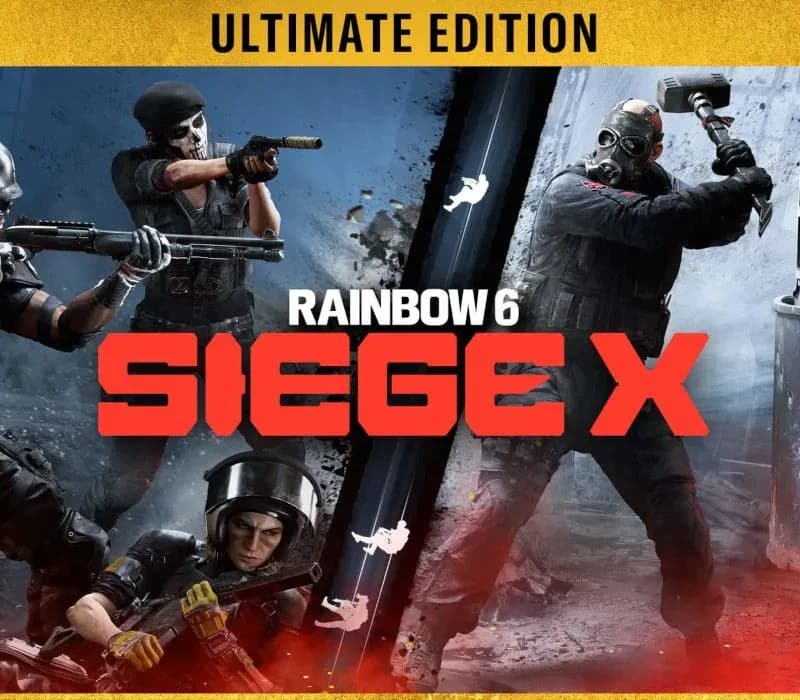
Tom Clancy's Rainbow Six Siege X Ultimate Edition PS4/PS5 Account
Sortie : 1 déc. 2015 · Développeur : Ubisoft Montreal · Éditeur : Ubisoft
Tom Clancy's Rainbow Six Siege X Ultimate Edition — PSN account for PS4/PS5, Global. Not a code — read the account-ban notice before buying.
Choisissez votre version
- Paiement sécuriséInstantané
- Clé révélée dans votre compte~60s
- Activer sur PlayStationActivation directe
 Pago Móvil
 Binance Pay
 Cryptomonnaies
 Portefeuille
154 000+ ventes en boutique et sur les marketplaces · Dernière commande livrée : il y a 34 minutes
Comment activer
- 1Allumez votre console PlayStation, choisissez "Ajouter un utilisateur" puis "Commencer" (ne choisissez pas invité temporaire).
- 2Connectez-vous au PSN avec l'adresse e-mail et le mot de passe fournis, et saisissez le code 2FA si nécessaire.
- 3Activez le partage : sur PS5, allez dans Paramètres -> Utilisateurs et comptes -> Autre -> "Partage de console et jeu hors ligne" -> Activer (sur PS4 : Paramètres -> Gestion du compte -> "Activer en tant que PS4 principale").
- 4Ouvrez la Bibliothèque de jeux -> "Votre collection", lancez le téléchargement et rebasculez sur votre profil personnel pour jouer.
À propos de ce jeu
Tom Clancy's Rainbow Six Siege X Ultimate Edition PS4/PS5 Account est un compte de jeu pour PlayStation, sans verrouillage régional.
Important — please read before buying: This is a PlayStation account created and supplied by a third-party seller, not a code for your own account. Sony's Terms of Service do not allow buying or selling PSN accounts, so a ban of the account (or restrictions on the console) is a likely possibility, though not a certainty, and we cannot guarantee the account will not be restricted. Do not change the account's country/region or add a payment method; play on your own profile via Console Sharing and Offline Play.
Tom Clancy's Rainbow Six Siege is the undisputed reference in tactical team shooters, where elite strategy and execution triumph. Enjoy free access to Quick Match and Unranked game modes with a selection of operators. Certain features like Ranked playlists, Siege Cup, additional operators, and cosmetics require payment to unlock.HIGH STAKES 5v5 ATTACK VS. DEFENSE Alternate between attack and defense, adapting your approach to each operator and map. Feel the thrill and intensity of the action as you leverage next-level destruction and gadgetry to outsmart and outplay your opponents in every round. On defense, transform your surroundings into fortified strongholds. Reinforce walls, set up barricades, and deploy traps to control enemy movement. Use surveillance tools to gather intel and anticipate their approach. Hold your ground, adapt to their tactics, and outplay the attackers at every turn. On attack, gather intel on enemy positions and the bomb site using your observation drones. Coordinate with your team to breach reinforced defenses, bypass traps, and create unexpected openings. Take your enemies by surprise with vertical plays – striking from above, below, or making a daring entry through windows by rappel. Plan your assault, execute, and defuse every situation.TOOLS OF DESTRUCTION Destruction is more than chaos: it is a key tool for your success. Use the environment to your advantage – turn walls into windows of opportunity. Use state-of-the-art technology to track enemy movements, shatter walls to create new lines of sight, and manipulate your surroundings to secure the tactical advantage.
Questions fréquentes
Pour quelle région est-ce ?
C’est la version Global : elle n’est pas verrouillée par région.
Comment activer Tom Clancy's Rainbow Six Siege X Ultimate Edition PS4/PS5 Account sur PlayStation ?
1. Allumez votre console PlayStation, choisissez "Ajouter un utilisateur" puis "Commencer" (ne choisissez pas invité temporaire). 2. Connectez-vous au PSN avec l'adresse e-mail et le mot de passe fournis, et saisissez le code 2FA si nécessaire. 3. Activez le partage : sur PS5, allez dans Paramètres -> Utilisateurs et comptes -> Autre -> "Partage de console et jeu hors ligne" -> Activer (sur PS4 : Paramètres -> Gestion du compte -> "Activer en tant que PS4 principale"). 4. Ouvrez la Bibliothèque de jeux -> "Votre collection", lancez le téléchargement et rebasculez sur votre profil personnel pour jouer.
Que signifie « compte » ?
Vous recevez les identifiants d’un compte PlayStation qui possède déjà le jeu.
Avis clients
Voir tous les avis et écrire le vôtre
Avis clients
Personne n'a encore donné son avis sur ce jeu. Si vous l'achetez, dites-nous ce que vous en pensez.
Vous aimerez aussi
 −70%
Star Wars Jedi: Fallen Order Deluxe Edition PS4 Account
 −69%
Nioh 2 Remastered – The Complete Edition PS4 Account
 −63%
Middle-earth: Shadow of War Definitive Edition PS4/PS5 Account
 −75%
Marvel's Spider-Man GOTY PS4 Account
 −54%