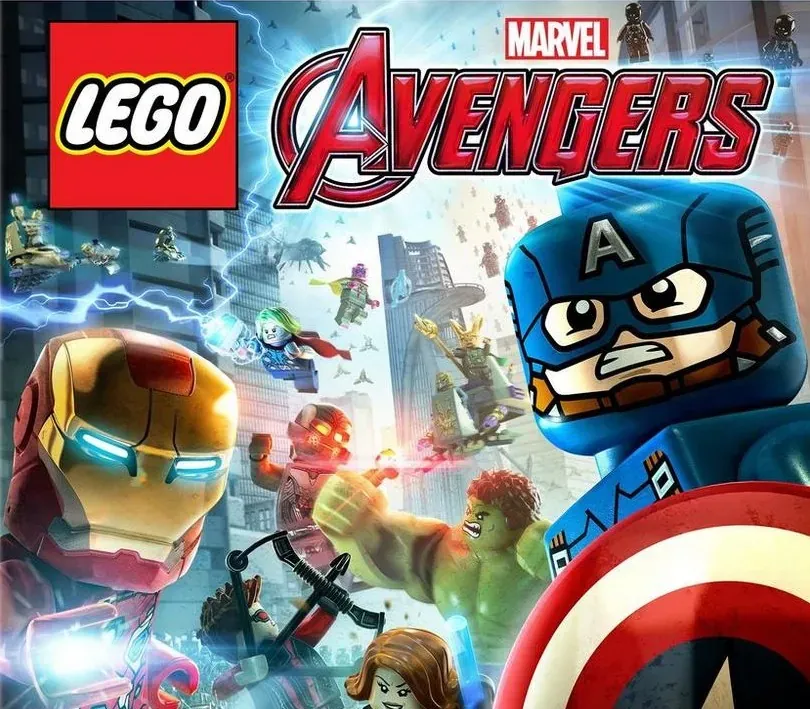

LEGO MARVEL's Avengers PC Steam CD Key
LEGO MARVEL's Avengers PC Steam CD Key is a digital key for Steam, not region-locked. Delivered instantly after payment. Price: $4.91, 75% below the Steam MSRP of $19.99.
⭐ 153,000+ orders delivered since 2018
 Pago Móvil
 Binance Pay
About this game
Avengers Assemble! The best-selling LEGO MARVEL videogame franchise returns with a new action-packed, Super Hero adventure. Join the LEGO MARVEL's Avengers team and experience a videogame featuring characters and storylines from the critically-acclaimed films and more. Play as the most powerful Super Heroes in their quest to save the world.
System Requirements
- Windows: OS: Windows XP/Vista/7/8/10 Processor: Intel Core 2 Quad Q6600 (2.4 GHz) / AMD Phenom x4 9850 (2.5 GHz) Memory: 4 GB RAM Graphics: GeForce GT 430 (1024 MB)/ Radeon HD 6850 (1024 MB) DirectX: Version 9.0c Network: Broadband Internet connection Storage: 14 GB available space Sound Card: DirectX compatible Additional Notes: Windows XP and DirectX® 9.0b and below not supported
- Mac: OS: 10.10.5 Processor: 1.8 GHz Memory: 4 GB RAM Graphics: The following graphics cards are not supported: ATI X1xxx series, ATI HD2xxx series, Intel GMA series, NVIDIA 7xxx series and NVIDIA 8xxx series. Storage: 15 GB available space Additional Notes: This game is not currently supported on volumes formatted as Case-sensitive.
How to activate
- Launch the Steam desktop client and log in to your account, or visit store.steampowered.com/account/registerkey in your browser.
- Click the "Games" menu at the top of the client (or click "+ Add a Game" at the bottom-left) and select "Activate a Product on Steam...".
- Follow the on-screen prompts, accept the Steam Subscriber Agreement, and enter your CD-Key in the "Product Code" field.
- Click "Next" and "Finish" to register the game. It will now appear permanently in your Steam Library ready to install.
Customer Reviews
Frequently asked questions
Which region is this for?
This is the Global version: it is not region-locked.
How do I activate LEGO MARVEL's Avengers PC Steam CD Key on Steam?
1. Launch the Steam desktop client and log in to your account, or visit store.steampowered.com/account/registerkey in your browser. 2. Click the "Games" menu at the top of the client (or click "+ Add a Game" at the bottom-left) and select "Activate a Product on Steam...". 3. Follow the on-screen prompts, accept the Steam Subscriber Agreement, and enter your CD-Key in the "Product Code" field. 4. Click "Next" and "Finish" to register the game. It will now appear permanently in your Steam Library ready to install.
How fast is delivery?
Your key appears in your account and is emailed to you right after payment.