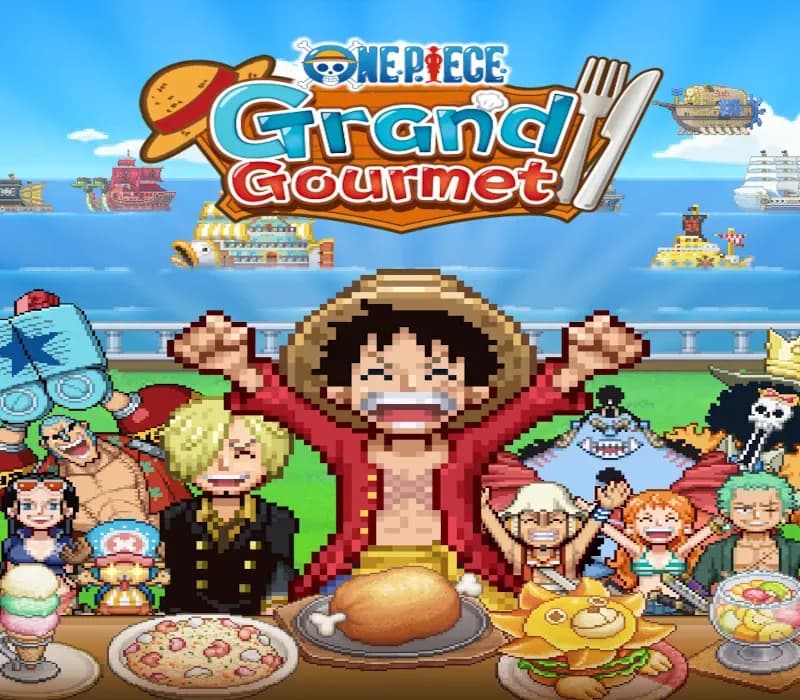
ONE PIECE: Grand Gourmet PC Steam CD Key
ONE PIECE: Grand Gourmet PC Steam CD Key is a digital key for Steam; it works in most countries, but not in some Latin American ones. Your key arrives as soon as payment clears.
Choose your version
How to buy it
- Steam
- Global
- Product code
154,000+ sales in our store and on marketplaces
 Pago Móvil
 Binance Pay
About this game
ONE PIECE comes to life as a restaurant management sim game!
As a new staff member, work alongside the Straw Hat Crew to turn the second location of the renowned Baratie floating restaurant into the greatest restaurant of the seas!
Get inspired by characters' ideas, choose your ingredients, and work with Sanji to cook delicious dishes. Arrange them into unique meal sets by adding different flourishes, then adventure to find even more recipes! From iconic series favorites like Water-Water Meat BBQ and Sea King Penne Gorgonzola to special creations that harness the powers of Devil Fruits, a treasure trove of dishes awaits.
Choose from over 200 furniture, building, and decorative items to make your restaurant uniquely yours! From dessert-themed Whole Cake Island pieces to futuristic Egghead items, the customization options are as vast as the sea. If a character likes your design, they may even become a regular!
From the Straw Hat Crew and beyond, over 400 ONE PIECE characters appear as staff and customers in a spritely pixel style for the first time in a game! With so many characters, you'll experience character events and special character interactions that can’t be found anywhere else.
System Requirements
Minimum
- OS: Windows 11
- Processor: Intel Core i3-8100 / AMD Ryzen 3 3100
- Memory: 8 GB RAM
- Graphics: NVIDIA GeForce GTX 750 Ti [2 GB] / AMD Radeon RX 560 [4 GB] / Intel Arc A310 [4 GB]
- DirectX: Version 12
- Storage: 2 GB available space
- Additional Notes: Estimated performance: 1080p/30fps. Framerate might drop in graphics-intensive scenes.
Recommended
- OS: Windows 11
- Processor: Intel Core i7-8700 / AMD Ryzen 5 4500
- Memory: 8 GB RAM
- Graphics: NVIDIA GeForce GTX 1070 Ti [8 GB] / AMD Radeon RX 5600 XT [6 GB] / Intel Arc A580 [8 GB]
- DirectX: Version 12
- Storage: 2 GB available space
- Additional Notes: Estimated performance: 1080p/30fps. Framerate might drop in graphics-intensive scenes. Windows 10 (Version 1809 or later) and a 4GB VRAM GPU (graphics board or video card) are required for DirectX 12 API.
How to activate
- Launch the Steam desktop client and log in to your account, or visit store.steampowered.com/account/registerkey in your browser.
- Click the "Games" menu at the top of the client (or click "+ Add a Game" at the bottom-left) and select "Activate a Product on Steam...".
- Follow the on-screen prompts, accept the Steam Subscriber Agreement, and enter your CD-Key in the "Product Code" field.
- Click "Next" and "Finish" to register the game. It will now appear permanently in your Steam Library ready to install.
About this game
ONE PIECE comes to life as a restaurant management sim game!
As a new staff member, work alongside the Straw Hat Crew to turn the second location of the renowned Baratie floating restaurant into the greatest restaurant of the seas!
Get inspired by characters' ideas, choose your ingredients, and work with Sanji to cook delicious dishes. Arrange them into unique meal sets by adding different flourishes, then adventure to find even more recipes! From iconic series favorites like Water-Water Meat BBQ and Sea King Penne Gorgonzola to special creations that harness the powers of Devil Fruits, a treasure trove of dishes awaits.
Choose from over 200 furniture, building, and decorative items to make your restaurant uniquely yours! From dessert-themed Whole Cake Island pieces to futuristic Egghead items, the customization options are as vast as the sea. If a character likes your design, they may even become a regular!
From the Straw Hat Crew and beyond, over 400 ONE PIECE characters appear as staff and customers in a spritely pixel style for the first time in a game! With so many characters, you'll experience character events and special character interactions that can’t be found anywhere else.
System Requirements
Minimum
- OS: Windows 11
- Processor: Intel Core i3-8100 / AMD Ryzen 3 3100
- Memory: 8 GB RAM
- Graphics: NVIDIA GeForce GTX 750 Ti [2 GB] / AMD Radeon RX 560 [4 GB] / Intel Arc A310 [4 GB]
- DirectX: Version 12
- Storage: 2 GB available space
- Additional Notes: Estimated performance: 1080p/30fps. Framerate might drop in graphics-intensive scenes.
Recommended
- OS: Windows 11
- Processor: Intel Core i7-8700 / AMD Ryzen 5 4500
- Memory: 8 GB RAM
- Graphics: NVIDIA GeForce GTX 1070 Ti [8 GB] / AMD Radeon RX 5600 XT [6 GB] / Intel Arc A580 [8 GB]
- DirectX: Version 12
- Storage: 2 GB available space
- Additional Notes: Estimated performance: 1080p/30fps. Framerate might drop in graphics-intensive scenes. Windows 10 (Version 1809 or later) and a 4GB VRAM GPU (graphics board or video card) are required for DirectX 12 API.
Customer Reviews
Nobody has reviewed this game yet. If you buy it, tell us how it went.
Frequently asked questions
Which region is this for?
This is the Global version: it works in most countries, but cannot be activated in some Latin American ones.
How do I activate ONE PIECE: Grand Gourmet PC Steam CD Key on Steam?
1. Launch the Steam desktop client and log in to your account, or visit store.steampowered.com/account/registerkey in your browser. 2. Click the "Games" menu at the top of the client (or click "+ Add a Game" at the bottom-left) and select "Activate a Product on Steam...". 3. Follow the on-screen prompts, accept the Steam Subscriber Agreement, and enter your CD-Key in the "Product Code" field. 4. Click "Next" and "Finish" to register the game. It will now appear permanently in your Steam Library ready to install.
How fast is delivery?
Your key appears in your account and is emailed to you right after payment.