 1 of 12
TANUKI: Pon's Summer PC Steam CD Key
Release: Nov 10, 2026 · Developer: Denkiworks · Publisher: CRITICAL REFLEX
TANUKI: Pon's Summer — Steam key for PC, Global. Delivered instantly after payment.
- Pay securelyInstant
- Key revealed in your account~60s
- Redeem on SteamDirect activation
Instant delivery
 Pago Móvil
 Binance Pay
 Crypto
 Wallet
154,000+ sales in our store and on marketplaces · Latest order delivered: 21 minutes ago
How to activate
- 1Launch the Steam desktop client and log in to your account, or visit store.steampowered.com/account/registerkey in your browser.
- 2Click the "Games" menu at the top of the client (or click "+ Add a Game" at the bottom-left) and select "Activate a Product on Steam...".
- 3Follow the on-screen prompts, accept the Steam Subscriber Agreement, and enter your CD-Key in the "Product Code" field.
- 4Click "Next" and "Finish" to register the game. It will now appear permanently in your Steam Library ready to install.
About this game
TANUKI: Pon's Summer PC Steam CD Key is a digital key for Steam, not region-locked. Your key arrives as soon as payment clears. Price: $18.15, 9% below the Steam MSRP of $19.99.
Come spend a summer in Japan
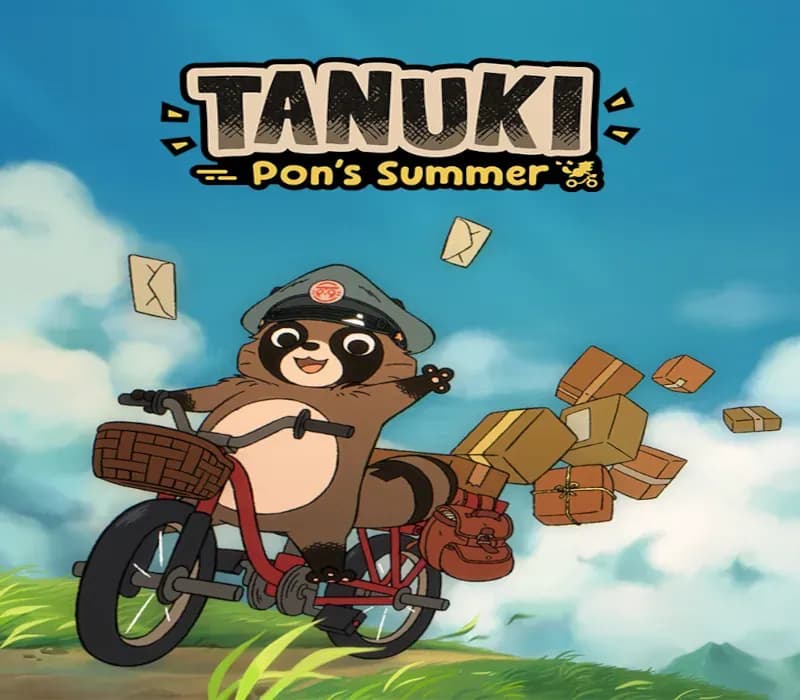
A whole month on a sunlit Japanese island, and you get to spend it as a little tanuki on a bicycle. Meet Pon: part-time postal worker, enthusiastic show-off, and your invitation to a summer of small adventures and people you’ll hate saying goodbye to. There’s a festival to prepare for and mail to deliver, so you’re going to have a very full summer.
Deliver mail, become a familiar face
Hop on your BMX, and bring letters and packages to the island’s colorful residents. Plan your delivery to fit all the awkwardly-shaped boxes on a bike, but don’t keep your neighbors waiting! As you learn your routes and get to know the people along them, the island begins to feel like your home.
Build the heart of your summer
Turn the money and rewards you’ve earned into a shrine worth falling in love with. Rebuild, upgrade and decorate it to your taste, watching your work come together as the Great Tanuki Festival approaches. Pon wants to do a good job. For all his showing off on that bicycle, he cares very much about the people here. When the Great Tanuki Festival arrives, you’ll have somewhere special to welcome the people you’ve spent the season getting to know.
You’re invited. To pretty much everything.
Getting to know the locals comes with an increasingly tempting list of invitations. Make sushi, join a baseball game, step into the sumo ring, and discover what else your new friends have going on. Every activity brings opportunities to earn rewards for the shrine, and another reason to get attached to the people who live here.
Be adorable. Land something ridiculous.
That little BMX can do a lot more than just carry the post. Launch off ramps, catch a rail and string tricks together as you explore the island’s paths and rooftops. Chase the satisfaction of a perfect landing across over 100 BMX challenges. Don’t worry, you’re allowed to look extremely pleased with yourself.
Yes, he needs another hat
Give Pon a look you love with crossover hats inspired by Hollow Knight: Silksong, PEAK, Shovel Knight and more. Bring a little of your favorite games along for the ride, whether you’re heading out on deliveries or showing off around town.
System Requirements
Minimum
- OS: Windows 10 or later
- Processor: 2.6 GHz Quad Core or similar
- Memory: 8 GB RAM
- Graphics: Nvidia GeForce 650 or AMD Radeon HD 7750 with at least 2 GB VRAM
- DirectX: Version 11
- Storage: 3 GB available space
Recommended
- OS: Windows 10 or later
- Processor: Intel Core i5 3GHz or AMD Ryzen 5 3GHz
- Memory: 8 GB RAM
- Graphics: Nvidia GeForce GTX 950 or AMD Radeon HD 7970 with at least 2 GB VRAM
- DirectX: Version 11
- Storage: 3 GB available space
Frequently asked questions
Which region is this for?
This is the Global version: it is not region-locked.
How do I activate TANUKI: Pon's Summer PC Steam CD Key on Steam?
1. Launch the Steam desktop client and log in to your account, or visit store.steampowered.com/account/registerkey in your browser. 2. Click the "Games" menu at the top of the client (or click "+ Add a Game" at the bottom-left) and select "Activate a Product on Steam...". 3. Follow the on-screen prompts, accept the Steam Subscriber Agreement, and enter your CD-Key in the "Product Code" field. 4. Click "Next" and "Finish" to register the game. It will now appear permanently in your Steam Library ready to install.
How fast is delivery?
Your key appears in your account and is emailed to you right after payment.
Customer Reviews
See all reviews and write yours
Customer Reviews
Nobody has reviewed this game yet. If you buy it, tell us how it went.