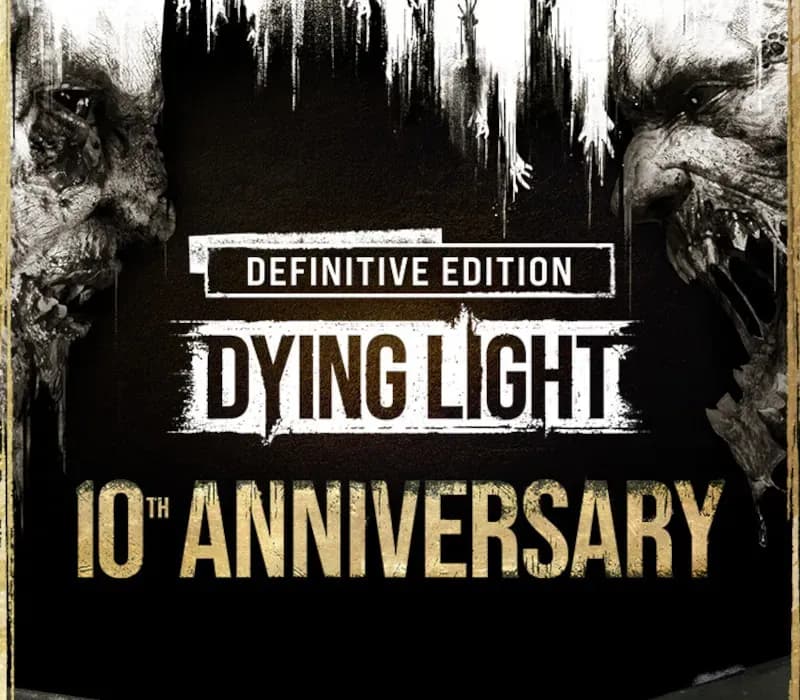
Dying Light Definitive 10th Anniversary Edition PC Steam CD Key (LATAM)
Dying Light Definitive 10th Anniversary Edition PC Steam CD Key (LATAM) is a digital key for Steam, valid in Latin America. Your key arrives as soon as payment clears.
Choose your version
Your country: United States
Platform
Edition
How to buy it
1 option that does not work in United States
⚠ This version does not work in United States.
The one that works:Key · Global$5.49See →
- Steam
- LATAM
- Product code
154,000+ sales in our store and on marketplaces
 Pago Móvil
 Binance Pay
About this game
Includes
- Dying Light (base game) Dying Light
- Cuisine & Cargo DLC Dying Light
- The Bozak Horde DLC Dying Light: The Following DLC Dying Light
- Ultimate Survivor Bundle DLC Dying Light
- Crash Test Skin Bundle DLC Dying Light
- Harran Ranger Bundle DLC Dying Light
- Gun Psycho Bundle DLC Dying Light
- Volatile Hunter Bundle DLC Dying Light
- White Death Bundle DLC Dying Light
- Vintage Gunslinger Bundle DLC Dying Light
- Rais Elite Bundle DLC Dying Light
- Godfather Bundle DLC Dying Light
- Harran Inmate Bundle DLC Dying Light
- Retrowave Bundle DLC Dying Light
- Shu Warrior Bundle DLC Dying Light
- 5th Anniversary Bundle DLC Dying Light
- Hellraid DLC Dying Light
- Volkan Combat Armor Bundle DLC Dying Light
- Volkan Combat Armor Bundle DLC Dying Light
- Classified Operation Bundle DLC Dying Light
- Viking: Raiders of Harran Bundle DLC Dying Light
- Harran Tactical Unit Bundle DLC Dying Light
- Savvy Gamer Bundle DLC Dying Light
- Astronaut Bundle DLC Dying Light
- Van Crane Bundle DLC Dying Light
- Snow Ops Bundle DLC Dying Light
- Dieselpunk Bundle DLC Dying Light
- 10th Anniversary Bundle DLC The game whose uncompromising approach to gameplay set new standards for first-person zombie games. Dying Light: Definitive 10th Anniversary Edition is all you need to start your adventure in the post-apocalyptic world ruled by zombies. It takes the gameplay experience to a brand new level.
System Requirements
- Windows: OS: Windows® 7 64-bit / Windows® 8 64-bit / Windows® 8.1 64-bit Processor: Intel® Core™ i5-2500 @3.3 GHz / AMD FX-8320 @3.5 GHz Memory: 4 GB RAM DDR3 Hard Drive: 40 GB free space Graphics: NVIDIA® GeForce® GTX 560 / AMD Radeon™ HD 6870 (1GB VRAM) DirectX®: Version 11 Sound: DirectX® compatible Additional Notes: Laptop versions of graphics cards may work but are NOT officially supported.Windows-compatible keyboard, mouse, optional controller (Xbox 360 Controller for Windows recommended)
- Mac: OS: macOS Sierra 10.12.1 Processor: Intel® Core™ i5 @3.20GHz Memory: 4 GB RAM DDR3 Hard Drive: 40 GB free space Graphics: AMD Radeon™ R9 M370X (2GB VRAM) Additional Notes: Only AMD Radeon™ graphics cards are officially supported.
- Linux: OS: Ubuntu 14.04 64-bit and newer recommended Processor: Intel® Core™ i5-2500 @3.3 GHz / AMD FX-8320 @3.5 GHz Memory: 4 GB RAM DDR3 Hard Drive: 40 GB free space Graphics: NVIDIA® GeForce® GTX 560 / AMD Radeon™ HD 6870 (1GB VRAM) Additional Notes: JFS and XFS file systems are not supported
How to activate
- Launch the Steam desktop client and log in to your account, or visit store.steampowered.com/account/registerkey in your browser.
- Click the "Games" menu at the top of the client (or click "+ Add a Game" at the bottom-left) and select "Activate a Product on Steam...".
- Follow the on-screen prompts, accept the Steam Subscriber Agreement, and enter your CD-Key in the "Product Code" field.
- Click "Next" and "Finish" to register the game. It will now appear permanently in your Steam Library ready to install.
About this game
Includes
- Dying Light (base game) Dying Light
- Cuisine & Cargo DLC Dying Light
- The Bozak Horde DLC Dying Light: The Following DLC Dying Light
- Ultimate Survivor Bundle DLC Dying Light
- Crash Test Skin Bundle DLC Dying Light
- Harran Ranger Bundle DLC Dying Light
- Gun Psycho Bundle DLC Dying Light
- Volatile Hunter Bundle DLC Dying Light
- White Death Bundle DLC Dying Light
- Vintage Gunslinger Bundle DLC Dying Light
- Rais Elite Bundle DLC Dying Light
- Godfather Bundle DLC Dying Light
- Harran Inmate Bundle DLC Dying Light
- Retrowave Bundle DLC Dying Light
- Shu Warrior Bundle DLC Dying Light
- 5th Anniversary Bundle DLC Dying Light
- Hellraid DLC Dying Light
- Volkan Combat Armor Bundle DLC Dying Light
- Volkan Combat Armor Bundle DLC Dying Light
- Classified Operation Bundle DLC Dying Light
- Viking: Raiders of Harran Bundle DLC Dying Light
- Harran Tactical Unit Bundle DLC Dying Light
- Savvy Gamer Bundle DLC Dying Light
- Astronaut Bundle DLC Dying Light
- Van Crane Bundle DLC Dying Light
- Snow Ops Bundle DLC Dying Light
- Dieselpunk Bundle DLC Dying Light
- 10th Anniversary Bundle DLC The game whose uncompromising approach to gameplay set new standards for first-person zombie games. Dying Light: Definitive 10th Anniversary Edition is all you need to start your adventure in the post-apocalyptic world ruled by zombies. It takes the gameplay experience to a brand new level.
System Requirements
- Windows: OS: Windows® 7 64-bit / Windows® 8 64-bit / Windows® 8.1 64-bit Processor: Intel® Core™ i5-2500 @3.3 GHz / AMD FX-8320 @3.5 GHz Memory: 4 GB RAM DDR3 Hard Drive: 40 GB free space Graphics: NVIDIA® GeForce® GTX 560 / AMD Radeon™ HD 6870 (1GB VRAM) DirectX®: Version 11 Sound: DirectX® compatible Additional Notes: Laptop versions of graphics cards may work but are NOT officially supported.Windows-compatible keyboard, mouse, optional controller (Xbox 360 Controller for Windows recommended)
- Mac: OS: macOS Sierra 10.12.1 Processor: Intel® Core™ i5 @3.20GHz Memory: 4 GB RAM DDR3 Hard Drive: 40 GB free space Graphics: AMD Radeon™ R9 M370X (2GB VRAM) Additional Notes: Only AMD Radeon™ graphics cards are officially supported.
- Linux: OS: Ubuntu 14.04 64-bit and newer recommended Processor: Intel® Core™ i5-2500 @3.3 GHz / AMD FX-8320 @3.5 GHz Memory: 4 GB RAM DDR3 Hard Drive: 40 GB free space Graphics: NVIDIA® GeForce® GTX 560 / AMD Radeon™ HD 6870 (1GB VRAM) Additional Notes: JFS and XFS file systems are not supported
Customer Reviews
Nobody has reviewed this game yet. If you buy it, tell us how it went.
Frequently asked questions
Which region is this for?
This is the Latin America version. Make sure your account is registered in that region before buying.
How do I activate Dying Light Definitive 10th Anniversary Edition PC Steam CD Key (LATAM) on Steam?
1. Launch the Steam desktop client and log in to your account, or visit store.steampowered.com/account/registerkey in your browser. 2. Click the "Games" menu at the top of the client (or click "+ Add a Game" at the bottom-left) and select "Activate a Product on Steam...". 3. Follow the on-screen prompts, accept the Steam Subscriber Agreement, and enter your CD-Key in the "Product Code" field. 4. Click "Next" and "Finish" to register the game. It will now appear permanently in your Steam Library ready to install.
How fast is delivery?
Your key appears in your account and is emailed to you right after payment.