
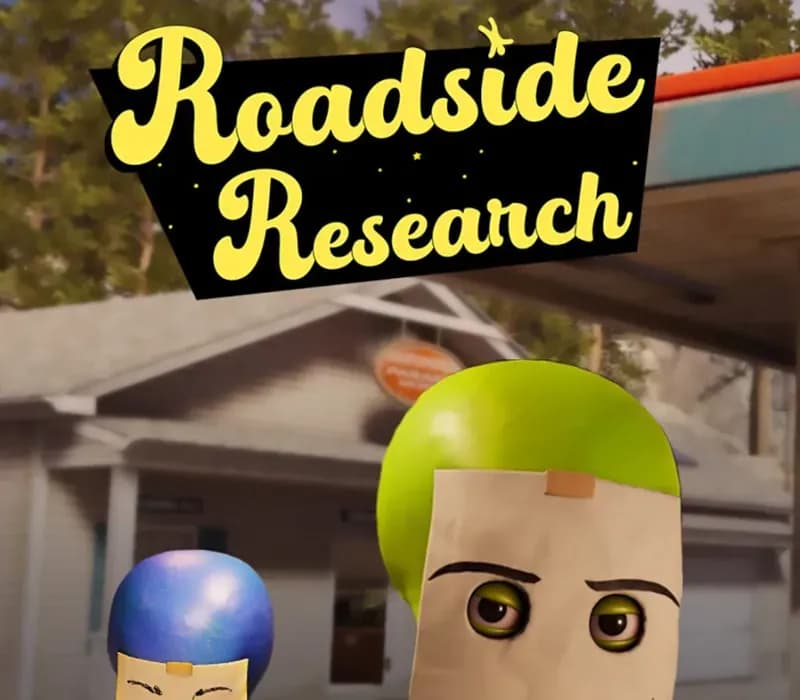
 1 of 8
Roadside Research PC Steam CD Key (EU)
Release: Feb 12, 2026 · Developer: Cybernetic Walrus · Publisher: Oro Interactive
Aliens have landed on Earth… to run a gas station. Play solo or up to 4 players and do human tasks to blend in. People depend on you, it’s your job to make sure that the shelves have the correct items, refuel customers passing by, and provide food for travelers. But most importantly, you must conduc
- Pay securelyInstant
- Key revealed in your account~60s
- Redeem on SteamDirect activation
Instant delivery
 Pago Móvil
 Binance Pay
 Crypto
 Wallet
154,000+ sales in our store and on marketplaces · Latest order delivered: 5 minutes ago
How to activate
- 1Launch the Steam desktop client and log in to your account, or visit store.steampowered.com/account/registerkey in your browser.
- 2Click the "Games" menu at the top of the client (or click "+ Add a Game" at the bottom-left) and select "Activate a Product on Steam...".
- 3Follow the on-screen prompts, accept the Steam Subscriber Agreement, and enter your CD-Key in the "Product Code" field.
- 4Click "Next" and "Finish" to register the game. It will now appear permanently in your Steam Library ready to install.
About this game
Roadside Research PC Steam CD Key (EU) is a digital key for Steam, valid in Europe. Your key arrives as soon as payment clears. Price: $12.20, 6% below the Steam MSRP of $12.99.
Aliens have landed on Earth… to run a gas station. Play solo or up to 4 players and do human tasks to blend in. People depend on you, it’s your job to make sure that the shelves have the correct items, refuel customers passing by, and provide food for travelers. But most importantly, you must conduct your research.
Stay Undetected Your mission is simple. Gather all data you can from humans without their knowledge. Scan, steal, and test various methods on customers while they stop by the gas station. Be careful not to raise the “suspicion meter” too high, as that will trigger the visit of government officials.
Be Normal, Be Human During the day, take care of the gas station as an ordinary employee. Restock the shelves, order wares for the shop, refuel passersby, and exchange goods for cash. At night you will be able to gather your thoughts, and plan for the next day. Upgrade and Customize Balance between two missions, upgrading the gas station to attract more customers and upgrading your alien tech to process data and gather information more efficiently.
To blend in, draw a very normal human expression on your state-of-the-art disguise. During closing hours, you can also upgrade the station, inside and outside to make sure everything is going according to plan.
Features
Chaotic solo or co-op fun: Gather friends or play alone to manage the gas station while pursuing your alien mission. Dual Upgrade Path: Manage upgrades for your gas station and for your alien technology at the same time Satisfying Simulation: Clean, cook, and stock your workplace with all necessary supplies and items to make sure every customer leaves satisfied. Alien Deception: Make sure to stay disguised and don’t get caught by human government officials.
If you are too suspicious, they will turn you into goo.
System Requirements
- Windows: Minimum: Requires a 64-bit processor and operating system OS: Windows 10 or Windows 11 Processor: Ryzen 3 2200G / Intel i5-7400 Memory: 8 GB RAM Graphics: AMD RX 570 / Nvidia GTX 1060 DirectX: Version 11 Storage: 6 GB available space
Frequently asked questions
Which region is this for?
This is the Europe version. Make sure your account is registered in that region before buying.
How do I activate Roadside Research PC Steam CD Key (EU) on Steam?
1. Launch the Steam desktop client and log in to your account, or visit store.steampowered.com/account/registerkey in your browser. 2. Click the "Games" menu at the top of the client (or click "+ Add a Game" at the bottom-left) and select "Activate a Product on Steam...". 3. Follow the on-screen prompts, accept the Steam Subscriber Agreement, and enter your CD-Key in the "Product Code" field. 4. Click "Next" and "Finish" to register the game. It will now appear permanently in your Steam Library ready to install.
How fast is delivery?
Your key appears in your account and is emailed to you right after payment.
Customer Reviews
See all reviews and write yours
Customer Reviews
Nobody has reviewed this game yet. If you buy it, tell us how it went.
You may also like
 −8%
Airframe Ultra CD Key
Euro Truck Simulator 2 - Iceland Gift
 −27%
Main Sequence CD Key (NA)
 −44%
Ashes of the Singularity II CD Key (EU)
 −15%